

The proliferation of Generative AI tools like GPT and Copilot has transformed the way professionals approach problem-solving, coding, business analysis, and daily productivity. However, the quality of AI-generated outputs hinges largely on the art of prompting. Crafting effective prompts is not merely a technical skill but an essential capability for harnessing the true potential of AI. This article explores the Five Principles of Prompting, offers actionable tips and tricks, and provides real-world examples to help AI professionals, developers, and business analysts design prompts that consistently yield professional-grade results.
The Five Principles of Prompting
Understanding and applying the principles of effective prompting is fundamental to working with Generative AI systems. The following five principles serve as a foundation for prompt engineering:
1. Clarity
Every prompt should be unambiguous and direct. Ambiguity leads to vague or irrelevant outputs. State your intent clearly, specify the desired format, and avoid unnecessary complexity.
2. Contextualisation
Provide adequate background information. Context helps the AI understand the scope and nuances of the task, whether it is code generation, summarisation, or analysis.
3. Specificity
Explicit instructions yield more accurate responses. Specify the style, length, structure, or any particular preferences. The more precise you are, the more aligned the output will be with your expectations.
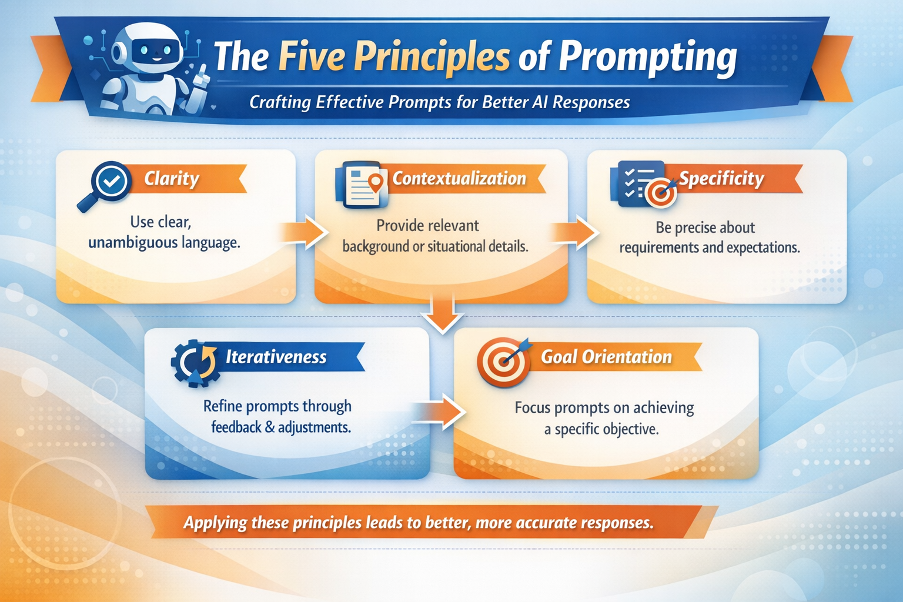
4. Iterativeness
Prompting is an iterative process. Do not hesitate to refine your prompts based on the AI’s responses. Iterative adjustments improve output quality over time.
5. Goal Orientation
Always define the end goal. Whether you are seeking a summary, a code snippet, or strategic insights, stating your objective ensures the response remains relevant and actionable.
Tips & Tricks for Professional-Grade Prompts
- Use examples: Demonstrate the expected output with a sample.
- Break down complex tasks: Divide multifaceted requests into smaller, manageable prompts.
- Leverage role-play: Ask the AI to act as an expert (e.g., “Act as a senior software engineer…”).
- Request step-by-step reasoning: For tasks requiring logic, ask the AI to explain its process.
- Set boundaries: Clearly state what to include or exclude in the response.
- Verify and iterate: Review AI outputs critically, refine your prompts, and re-run as needed.
Common pitfalls include being too vague, overloading prompts with multiple unrelated tasks, or failing to specify the desired output format. Best practices revolve around simplicity, precision, and continuous refinement.
Prompting Examples in Code Development and Reverse Engineering
Code Development with Copilot or GPT
Example prompt: “Generate a Python function that validates an email address using regular expressions. Include comments explaining each step.”
Here, clarity and specificity guide the AI to produce a well-documented, readable function. If the initial output lacks thorough comments, refine with: “Add detailed comments for each line.”
Reverse Engineering
Example prompt: “Explain what this segment of Java code does. Highlight any security vulnerabilities and suggest improvements.”
Providing the code as context enables the AI to deliver precise analysis, combining code comprehension with security assessment.
Designing Prompts for Summary Reports
For summarising multiple documents, structure your prompt to instruct the AI to identify and synthesise key points:
“Summarise the main findings from the attached project reports. Highlight recurring themes and any discrepancies across the documents. Present the summary in bullet points.”
This approach ensures the summary is concise, comparative, and easy to digest.
Research Analysis Prompts for Client Organisations
When conducting research analysis, specificity and context are crucial. For example:
“Analyse the annual reports and news articles related to XYZ Ltd. Identify their growth strategies, market challenges, and recent investments. Provide a summary with supporting evidence from the sources.”
Such prompts guide the AI to synthesise information from diverse materials and deliver actionable insights.
Understanding Organisational Priorities
To uncover both short-term and long-term priorities, frame your prompt to distinguish between the two:
“Based on the strategic documents of ABC Corp, list the organisation’s short-term (within one year) and long-term (beyond one year) priorities. Present the findings in a comparative table.”
This instructs the AI to structure its output clearly, facilitating strategic analysis.
Improving Developer Productivity with Generative AI
Generative AI can automate repetitive tasks, generate boilerplate code, and assist with debugging. Example prompts include:
- “Generate unit tests for this function in JavaScript.”
- “Suggest code optimisations to improve performance in this Python script.”
- “Document this API endpoint for the developer portal.”
Such prompts streamline development workflows, reduce manual effort, and foster best practices.
Handling Daily Activities with Generative AI
Meetings
“Summarise the key decisions and action items from today’s project meeting. List the responsible team members and deadlines.”
Email Summarisation & Follow-Ups
“Summarise this email thread and draft a polite follow-up message to the client.”
Preparing TODO Lists & Task Prioritisation
“Create a prioritised TODO list from these meeting notes, categorising tasks as urgent, important, or routine.”
By specifying categories, you enable the AI to organise tasks effectively, supporting better time management.
Conclusion
Mastering the art of prompting is a journey that demands clarity, context, specificity, iteration, and a focus on end goals. By embracing these principles and applying the tips and techniques discussed, professionals can unlock the full power of Generative AI for code development, organisational analysis, productivity enhancement, and daily task automation. Remember, the most effective prompts are those that evolve through experimentation and refinement. Start with clear objectives, review the outputs, and continue to iterate—this is the surest path to consistently professional AI-generated results.