

By Chiranjib Ghatak
This is a hands-on technical walkthrough of how I built two real, working agentic AI tools — a Gmail Cleanup Agent and a Local File Organiser — using Claude AI, Model Context Protocol (MCP), and Claude Code. No servers. No complex setup. Just Claude, a browser, and a terminal.
The Starting Point — A Simple Frustration
I had two problems that I had been ignoring for years.
Problem one: My Gmail inbox had thousands of old, unread emails sitting there — newsletters I never opened, automated notifications from systems I no longer use, cold sales emails I ignored in 2020. Every year it grew. My storage was filling up. Finding anything important was getting harder.
Problem two: My Downloads folder on my Mac was a graveyard. 800+ files with names like invoice_final_FINAL_v3.pdf, Screenshot 2021-03-14 at 09.23.11.png, zoom_installer.pkg. A complete mess. I kept saying I’d organise it. I never did.
Both problems had the same root cause: the manual effort to fix them felt disproportionate to the reward. So I decided to build AI agents to do it for me.
What I didn’t expect was how fast this would happen — and how little infrastructure it required.
What Is an Agentic AI — Really?
Before I get into the build, I want to be precise about what “agentic AI” actually means, because the term gets thrown around loosely.
A regular AI interaction looks like this:
You ask → AI answers → Done
An agentic AI interaction looks like this:
You give a goal → AI plans → AI uses tools → AI evaluates results
→ AI takes action → AI reports back → You confirm or adjust
The difference is autonomy over a sequence of steps. The agent doesn’t just answer — it reasons about what to do next, calls external tools, interprets what comes back, and makes decisions based on that.
In both tools I built, Claude acts as the agent. It receives a goal, decides which Gmail or filesystem tools to call, evaluates the results against defined criteria, and presents a structured output for human review before taking any irreversible action.
That last part — human review before irreversible action — is a design principle, not a technical constraint. It’s how responsible agentic AI should be built.
Tool 1 — The Gmail Cleanup Agent
The Problem in Numbers
Most professionals have been using Gmail for 10+ years. Over that time, the inbox accumulates:
- Newsletters subscribed to and never read
- One-way automated notifications (bank alerts, booking confirmations, app updates)
- Cold sales emails that were ignored
- Alerts from systems no longer in use
None of these were opened. No one replied. Gmail didn’t flag them as important. They just accumulated — quietly eating storage and polluting search results.
The solution: an agent that finds exactly these emails, shows them to you, and moves them to Trash with your confirmation.
The Architecture

Five distinct layers. Each has a single responsibility. Nothing crosses between them uncontrolled.
What Is MCP?
MCP stands for Model Context Protocol. It is an open standard created by Anthropic that allows Claude to connect to external services as tools — not through custom API integrations, but through a standardised protocol that any service can implement.
Google has implemented MCP for Gmail, Google Calendar, and Google Drive. When you connect Gmail to Claude.ai in settings, you grant OAuth2 access. Claude can then use that connection to search your inbox, read email metadata, and move emails to Trash — all from inside an AI conversation.
This is the key enabler. Without MCP, building this would require:
- A Google Cloud project with Gmail API enabled
- OAuth2 credentials and a redirect flow
- A backend server to handle the OAuth callback securely
- Token refresh logic
- Environment variables and secret management
With MCP and Claude Pro: connect Gmail in Settings, and the connection is live. No backend. No credentials to manage.
The Filter Logic -Five Criteria
The agent uses a compound filter. An email must pass all five conditions to be considered for deletion:
- ConditionGmail QueryWhyNever openedis:unread
- If you never read it, it held no valueNot importantNOT is:important
- Gmail’s own classifier agrees it’s low priorityOlder than 3 yearsbefore:YYYY/MM/DD
- Time has made it irrelevantNo repliesthread.count == 1
- No conversation ever attached to itNot starredNOT is:starred
You never manually flagged it to keep
If any one condition fails, the email is skipped. This is deliberately conservative. A false negative — leaving junk in the inbox — is far preferable to a false positive — deleting something needed.
The Gmail query looks like this:
is:unread -is:important before:2023/05/23 in:inbox -is:starred
The thread count check happens client-side after the search returns, since Gmail’s query language doesn’t support it directly.
The Agent Implementation — Two Separate API Calls
The most important architectural decision I made was splitting the agent into two distinct Claude API calls:
Call 1 — Scan Agent
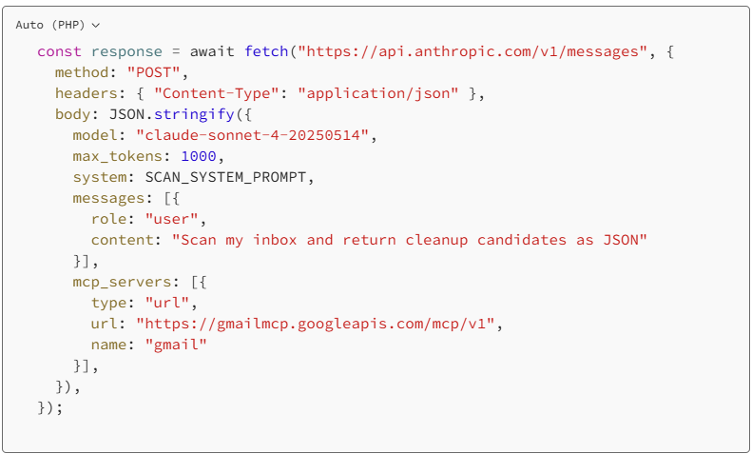
Call 2 — Trash Agent (only after user confirmation)

Why two calls? Because scan and delete are two fundamentally different operations with different risk profiles. Scan is read-only and safe to fail. Delete is a write operation with real consequences. Separating them means:
- Scan can fail without touching anything
- The user sees results before any write operation begins
- Each call has a single, auditable responsibility
The System Prompt — Where Intelligence Lives
The model itself is not what makes this agent smart. The system prompt is.
You are a Gmail cleanup agent.
An email is a candidate ONLY if ALL of the following are true:
1. It is UNREAD
2. It is NOT marked as important
3. It was received MORE than 3 years ago
4. The thread has only 1 message
5. It is NOT starred
Return results as a JSON array. No markdown. No preamble. ONLY valid JSON.
The last two lines are critical. Without explicit format instructions, Claude wraps output in explanation text and JSON.parse() fails. This is the most common mistake when building production LLM integrations.
The UI State Machine
The React frontend has seven states:
idle → scanning → preview → confirming → trashing → done → error
Each state renders a completely different screen. Transitions are controlled — you cannot jump from scanning to trashing without passing through preview and confirming. The confirmation gate is not optional.
This is the human-in-the-loop design pattern. The agent does the work. The human makes the final call.
Safety Architecture
Three deliberate decisions made this safe:
- Trash, not delete. The agent calls gmail.trash(), not permanent delete. Gmail keeps Trash for 30 days. You have a full recovery window.
- Double confirmation. Preview screen shows you what will be moved. Confirm screen asks again. Two clicks before any write action.
- Conservative filter. All five criteria must pass. The agent would rather leave junk in your inbox than delete something you needed.
Platform Decision — Why Claude.ai Artifact, Not Claude Code
When I decided to build this, I had three options:
OptionWhat It IsRight Choice?Claude.ai ArtifactInteractive UI inside Claude chat Yes — start hereClaude CodeTerminal-based agentic coding tool Overkill for thisAPI + Custom BackendYour own server calling Claude⏳ Future state
Claude.ai Artifact was the right choice because:
- Gmail MCP was already connected through Claude Pro
- The artifact runs in the browser — zero local setup
- The Anthropic API call happens directly from the browser
- The entire tool — UI, agent logic, MCP connection — lives in one JSX file
The build path was: open Claude.ai → describe what I want → Claude writes the React component → runs immediately in the artifact panel.
No npm install. No local environment. No backend. Done in one session.
Tool 2 — The Local File Organiser
The Problem
Downloads folder. 800+ files. Zero organisation. Years of accumulated chaos.
The solution: a CLI tool that scans a folder, categorises every file by extension and filename keywords, shows you the proposed organisation, and moves everything into a clean folder structure — with your confirmation.
The Architecture
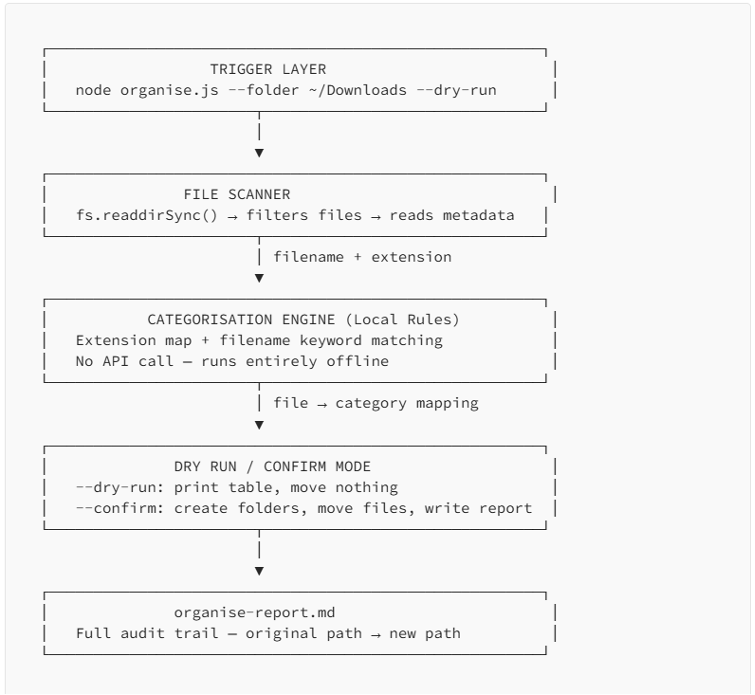
The Categorisation Rules
No API call needed. Pure extension and keyword matching:
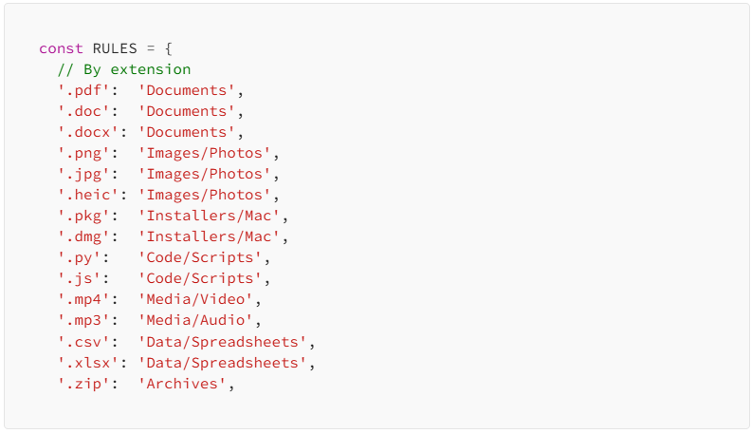

Anything unrecognised goes to Misc. Nothing is ever deleted.
The Output Folder Structure

Where Claude Code Fit In
This is where the platform decision changes. For the File Organiser, I used Claude Code — the desktop terminal-based agent — instead of a Claude.ai Artifact.
Because this tool:
- Runs on your local machine, not in a browser
- Needs to read and write your actual filesystem
- Is a Node.js CLI, not a React UI
- Has no browser-based UI component
Claude Code’s job was to write the tool, not be the tool. I opened Claude Code desktop, pointed it at an empty project folder, and gave it one prompt:
Build a local file organiser CLI tool in Node.js called organise.js. Accept — folder and — dry-run/ — confirm flags. Categorise files by extension and filename keyword. Show a table in dry-run mode. Move files and generate organise-report.md in confirm mode. Never delete. Unrecognised files go to Misc.
Claude Code then:
- Created organise.js — 220 lines of working code
- Created package.json with the right dependencies
- Created .gitignore
- Created README.md with full usage documentation
- Explained every architectural decision
No back and forth. No “here’s a snippet, fill in the rest.” A complete, working project — autonomously.
This is what Claude Code is for. Not for running the agent logic, but for being the agent that builds the tool.
Running It
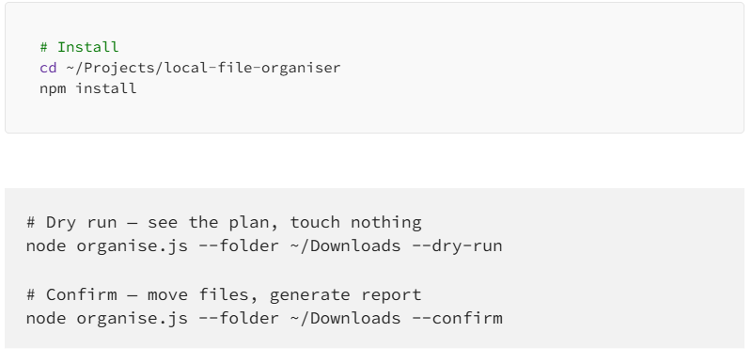
The dry run output:

What I Learned About Building With Agentic AI
- The system prompt is the architecture. The model is a capable general-purpose reasoner. The system prompt is what turns it into a specific, reliable agent. Get the system prompt right — explicit criteria, strict output format, clear failure modes — and the agent behaves predictably. Skip this and you get unpredictable, hard-to-debug behaviour.
- Split read and write operations. Never combine scanning and acting in one agent call. Scan first, present results, get confirmation, then act. This pattern makes your agent safe, debuggable, and trustworthy.
- Right tool, right job. Claude.ai Artifact for browser-based tools with MCP connections. Claude Code for writing local CLI tools and applications. API + backend for production systems with scheduling and persistence. These are not interchangeable — each has a specific domain.
- Human in the loop is a design principle, not a limitation. Every well-designed agentic system should have a confirmation gate before irreversible actions. Not because the AI can’t be trusted, but because the human should always understand and approve what’s about to happen to their data.
- MCP removes the hardest part of building AI integrations. Connecting to Gmail used to mean OAuth flows, credential management, token refresh, and API wrappers. With MCP and Claude Pro, it’s a URL parameter in an API call. The protocol handles everything else. This fundamentally changes what’s possible to build in an afternoon.
What’s Next
Both tools are on GitHub. Here’s where I’m taking them:
Gmail Cleanup Agent:
- Google Apps Script trigger for true Sunday automation
- Configurable year threshold
- Unsubscribe detection for mailing lists
- Storage estimate showing how much space will be freed
Local File Organiser:
- Recursive folder scanning (currently top-level only)
- Duplicate detection
- Run history log
- Watch mode — auto-organise new files as they land
The Bigger Picture
I started this thinking I was solving two personal organisation problems. What I actually built was a reference implementation for a new way of working with AI.
The pattern is:
Define the goal precisely
→ Give the agent the right tools
→ Apply strict filter logic
→ Show results before acting
→ Get human confirmation
→ Execute with full audit trail
This pattern works for email cleanup. It works for file organisation. It works for incident triage, data pipeline monitoring, PR review, compliance checking — any workflow where an AI agent can do the scanning and reasoning faster than a human, but the human should still be in the loop for the final call.
The infrastructure barrier to building this has effectively disappeared. You need a Claude Pro account, an afternoon, and a clear problem statement.
The rest is just prompting and patience.
Resources
- Gmail Cleanup Agent — GitHub: github.com/cghat87/gmail-cleanup-agent
- Local File Organiser — GitHub: github.com/cghat87/local-file-organiser
- Anthropic MCP Documentation: docs.anthropic.com/mcp
- Model Context Protocol Spec: modelcontextprotocol.io

Chiranjib Ghatak
Chiranjib Ghatak is a Senior Enterprise Architect based in Dubai. This article documents a real build session completed using Claude Pro and Claude Code.