

Microservices have transformed enterprise architecture by enabling modular, scalable, and independently deployable services. However, as organisations adopt microservices, they often encounter complexities in managing diverse client requirements, data aggregation, and communication patterns. The Backend for Frontend (BFF) pattern has emerged as an elegant solution to bridge the gap between microservices and client applications, offering tailored experiences while simplifying client interactions. This article explores the BFF pattern in depth, focusing on its operation, benefits, and implementation on leading cloud platforms such as Azure and AWS.
What is Backend for Frontend (BFF)?
The Backend for Frontend (BFF) is an architectural pattern where a dedicated backend service is created for each client type—such as web, mobile, or desktop applications. Instead of exposing microservices directly to clients, the BFF acts as a mediator, providing client-specific APIs, aggregating data from various microservices, and performing transformations as needed. By doing so, it tailors responses to the unique requirements of each client, ensuring optimal performance and usability.
Core Concepts
- Client-Specific Backends: Each frontend (e.g., mobile app, web portal) interacts with its own BFF, which understands the frontend’s needs and delivers appropriate data.
- Data Aggregation: The BFF collects and combines data from multiple microservices, presenting a unified response to the client.
- Reduced Client Complexity: By offloading logic and orchestration to the BFF, client applications remain lightweight and maintainable.
How BFF Works
Client-Specific APIs
In a typical microservices architecture, clients might need to make multiple calls to different services, handle data transformation, and manage business logic. The BFF pattern abstracts these complexities by providing a single entry point per client type. For example, a mobile app BFF may offer APIs optimised for bandwidth and latency, while a web BFF could deliver richer data sets and interactive features.
Data Aggregation
When a client requests information, the BFF fetches data from relevant microservices, processes and aggregates it, and returns a synthesised response. This reduces the number of API calls from the client, improves performance, and ensures consistency in data presentation.
Reducing Client Complexity
Clients no longer need to be aware of the underlying microservices landscape. The BFF handles authentication, authorisation, data formatting, and error handling, allowing developers to focus on frontend features rather than backend orchestration.
Benefits of the BFF Pattern
- Customisation: APIs can be tailored to the specific needs of each client, enhancing user experience.
- Improved Security: Sensitive logic and authentication are centralised, reducing exposure of internal microservices.
- Easier Maintenance: Changes to client requirements only impact the corresponding BFF, not all microservices.
- Performance Optimisation: By aggregating and transforming data server-side, BFFs minimise client-side processing and reduce network overhead.
- Scalability: Each BFF can be scaled independently based on client demand and usage patterns.
BFF on Azure and AWS
Implementing the Backend for Frontend (BFF) pattern with native services on AWS and Azure makes it much easier to deliver tailored, efficient experiences to different clients.
Azure Implementation
On Azure, you can set up your BFF using Azure App Service or Azure Functions, which come with built-in scaling and seamless integration with security features like Azure Active Directory. For managing and exposing your APIs, Azure API Management steps in to handle things like throttling and monitoring. Meanwhile, communication with microservices happens through Azure Service Bus or direct HTTP APIs, with robust monitoring provided by Azure Monitor and Application Insights.

Figure: Reference architecture of BFF using native services in Azure
- Service Selection: Use Azure App Service or Azure Functions to host the BFF. These services offer managed environments, auto-scaling, and integration with Azure Active Directory for authentication.
- API Management: Employ Azure API Management to expose BFF endpoints to frontends, manage throttling, and enable monitoring.
- Integration: The BFF communicates with microservices via Azure Service Bus or HTTP APIs, aggregating data and handling business logic.
- Security: Implement OAuth 2.0 or OpenID Connect using Azure Active Directory, ensuring secure access to BFF APIs.
- Monitoring: Leverage Azure Monitor and Application Insights for logging, performance analytics, and alerting.
AWS Implementation
On the AWS side, the BFF can be deployed using AWS Lambda for a serverless approach or container platforms like Amazon ECS and Elastic Beanstalk. AWS API Gateway acts as the traffic controller, routing requests while taking care of authentication and usage analytics. Overall, both cloud platforms provide a comprehensive suite of tools that streamline BFF deployment, enhance scalability, and strengthen security for modern applications.
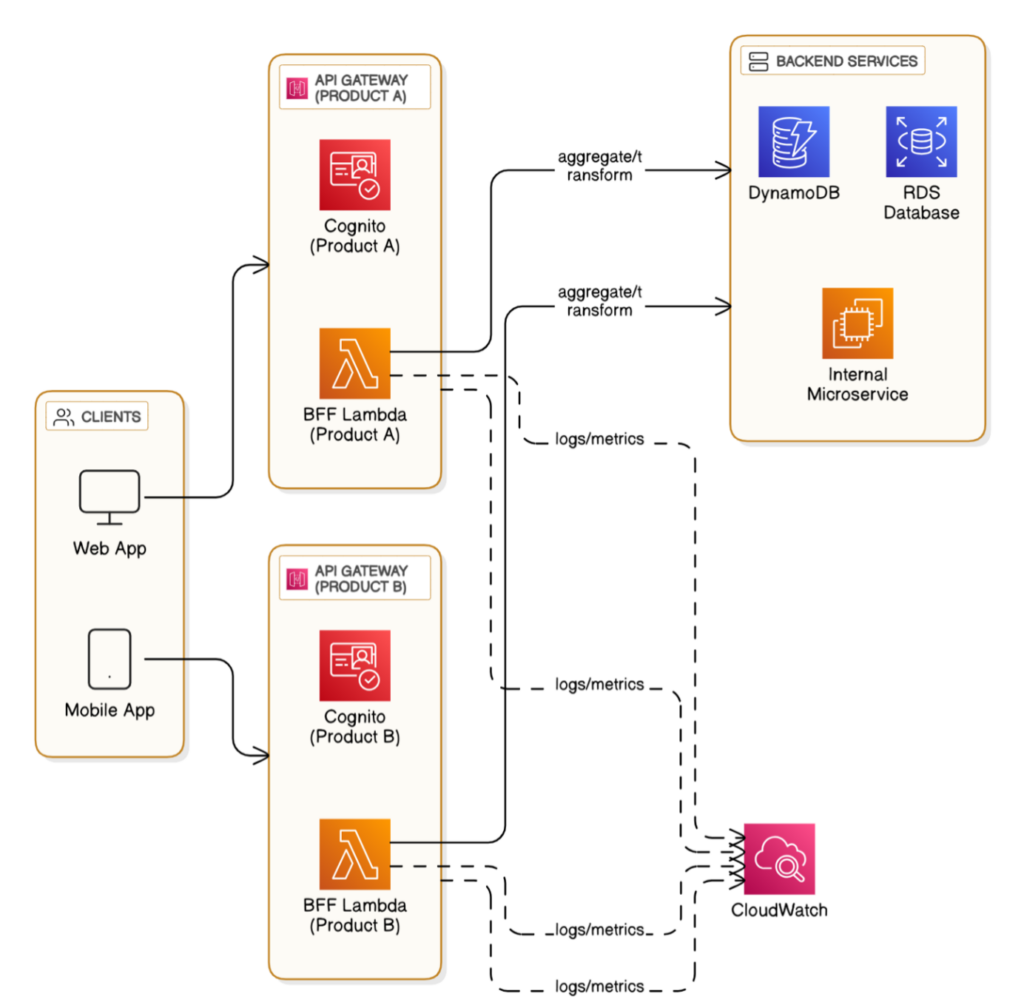
Figure: Reference architecture of implementing BFF pattern using AWS native services
- Service Selection: Deploy the BFF using AWS Lambda (for serverless) or Amazon ECS/Elastic Beanstalk for containerised applications.
- API Gateway: Use AWS API Gateway to route client requests to the BFF, manage authentication, and monitor usage.
- Integration: The BFF interacts with microservices over AWS SNS/SQS or direct RESTful APIs, performing data aggregation and transformation.
- Security: Integrate with AWS Cognito for user authentication and authorisation, securing BFF endpoints.
- Monitoring: Utilise CloudWatch for logging, metrics, and alerts, ensuring operational visibility.
These native services on Azure and AWS enable rapid development, scaling, and secure operation of BFFs, aligning with enterprise standards and cloud best practices.
BFF vs API Gateway: Key Differences in Cloud Architecture
While both BFF and API gateway patterns facilitate communication between clients and backend services, their roles and use cases differ significantly. An API gateway is a centralised entry point for all clients and APIs, offering features like routing, rate limiting, and protocol translation. In contrast, the BFF is tailored for specific client types, handling custom logic, data aggregation, and transformation unique to each frontend.
Use Cases
- BFF: Ideal for scenarios where different clients require distinct data formats, business logic, or performance optimisations.
- API Gateway: Suited for general API management, cross-cutting concerns (such as authentication, logging), and centralised routing.
Below Comparison Table explain various aspects between BFF vs API Gateway.
| Aspect | Backend for Frontend (BFF) | API Gateway |
| Purpose | Client-specific API, data aggregation, custom logic | Centralised API management, routing, protocol translation |
| Target Clients | Single client type (e.g., mobile, web) | Multiple client types |
| Data Transformation | Extensive, based on client needs | Limited, mostly protocol or format translation |
| Business Logic | Customised per client | Minimal, focuses on routing |
| Scalability | Independent scaling for each BFF | Centralised scaling |
| Security | Client-specific authentication/authorisation | General authentication/authorisation |
| Maintenance | Changes affect only relevant client BFF | Changes impact all clients |
Best Practices for Implementing BFF in Cloud Environments
- Design for Client Needs: Create separate BFFs for each client type to ensure tailored experiences and maintain clear boundaries.
- Secure Communication: Use robust authentication and authorisation mechanisms, such as OAuth 2.0, OpenID Connect, or cloud-native identity services.
- Automate Deployments: Employ CI/CD pipelines for BFF deployment, enabling rapid iteration and consistent releases.
- Monitor and Log Extensively: Integrate cloud-native monitoring and logging tools to track performance, errors, and usage patterns.
- Minimise Coupling: Keep BFFs loosely coupled with microservices, allowing independent evolution and scaling.
- Test Thoroughly: Implement comprehensive unit, integration, and end-to-end tests to ensure reliability and maintainability.
- Document APIs: Provide clear and up-to-date documentation for BFF endpoints to facilitate frontend development and integration.
Conclusion
The Backend for Frontend (BFF) pattern is a powerful tool in the enterprise architect’s arsenal, enabling client-specific API design, efficient data aggregation, and reduced client complexity. By leveraging BFFs on cloud platforms like Azure and AWS, organisations can deliver tailored, secure, and scalable solutions for diverse client applications. While API gateways remain essential for centralised API management, BFFs offer the flexibility and customisation necessary for modern, user-centric enterprise systems. Adopting best practices ensures that BFF implementations remain robust, maintainable, and aligned with business goals, paving the way for successful microservices adoption in the cloud era.